Vouchers in the App
Open Voucher
Once a voucher is assigned to a member, a bubble or icon with a gift will be shown on the home screen of the mobile app.
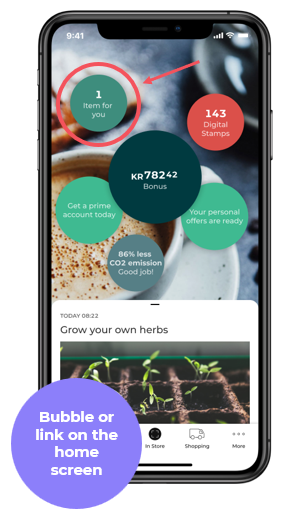
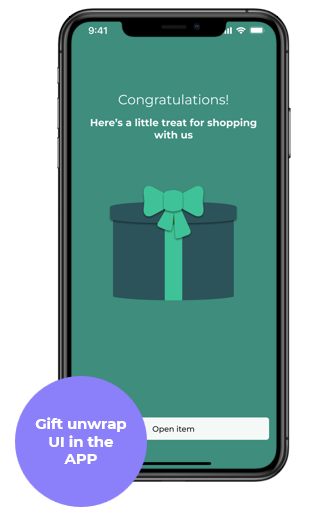
When the user clicks to open the blob, a gift unwarp animation is played. Afterwards, the details and terms and conditions of the voucher are shown.
The details are dynamically populated on the voucher: validity period, bonus (percentage or amount), minimum spent and maximum bonus, chain or store validity, and others.
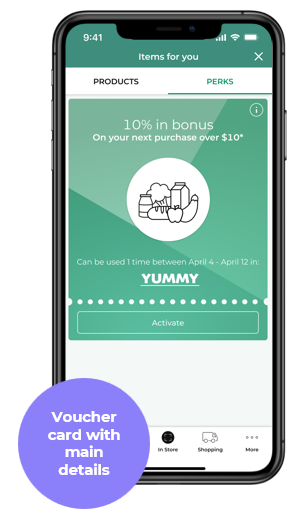
Activate voucher
After opening the voucher, the user needs to activate it. The voucher can only be applied after activation.
⚠️Only one voucher can be active at a time. If a user has multiple vouchers, he can deactivate the currently active voucher and activate another voucher.
The main reason is the complex priority and stacking rules that would have to be implemented and would just increase the friction for the end user to understand which of the multiple active vouchers was used. He would have to understand why and how he got a bonus when multiple vouchers are used on a basket.
The user can now make a purchase, and if all voucher conditions are met, the voucher will be applied, and the bonus will be added to the member's bonus (points) account.