Game attempts per member
Game outcomes and missing rewards are often Customer Service complaints, so you can view the game attempts and outcomes (win/lose/not finished) at member level in the Lobyco Membership section.
Search for a member in the Membership section and click on the Games tab. Only the played games (expired or active) are displayed. The data does not include games not played, either active or expired.
By default, there is a filter for the games played in the last 30 days.
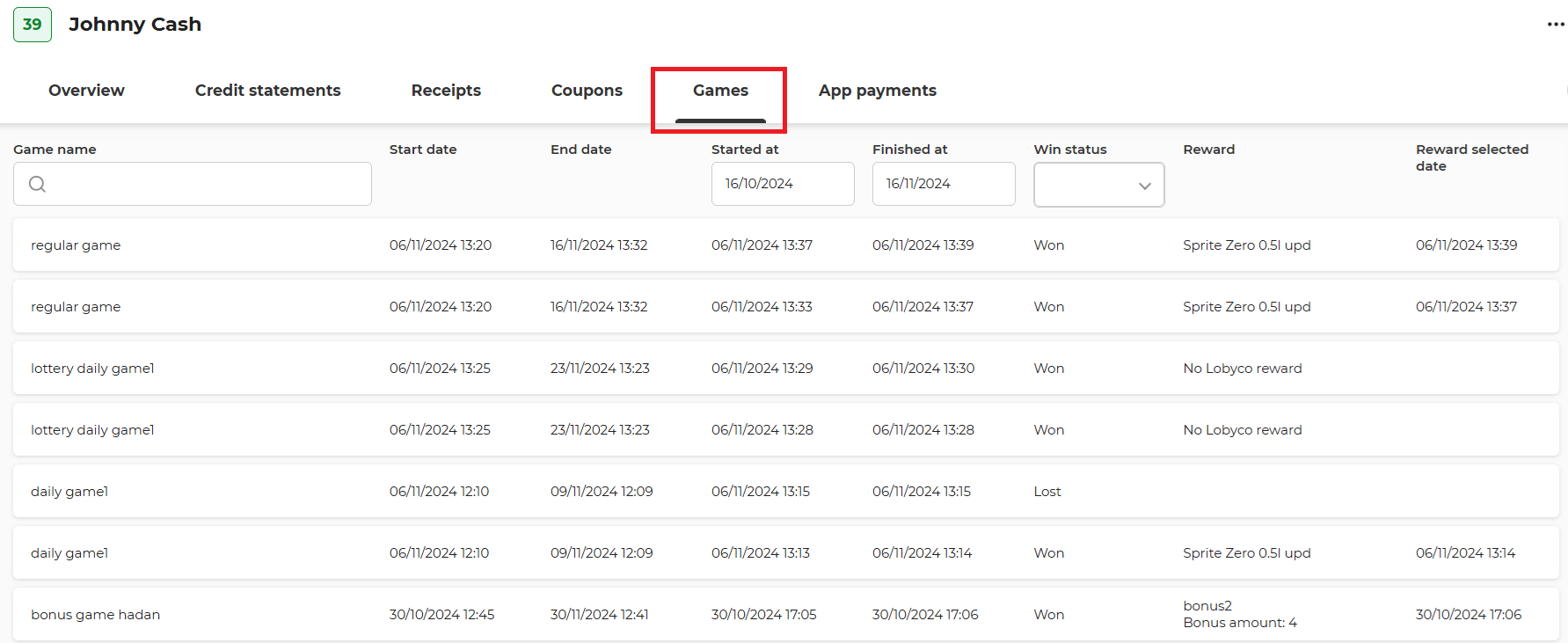
Game attempts data
- Game Name: name of the Game activity.
- Start Date: the date when the Game activity started.
- End Date: the date when the Game activity ended.
- Started At: timestamp when the member started the game attempt.
- Finished At: timestamp when the member finished the game attempt (if applicable). This is populated only if the user reaches the Win Page or the Lose Page.
- Win Status: indicate if the member won (completed the game and was shown the Win Page), lost (completed the game and was shown the Lose Page), or did not finished (started the game but closed it before he got to the Win or Lose page).
- Reward: Shows the name of the reward if the winning status is won. If a reward is a bonus, both the reward and bonus amount are shown.
- Reward Selected At: Exact timestamp when the reward was selected (if applicable). This is by default the same as Finished At, and differs only for custom implementations for some Lobyco customers, where on multiple rewards games the user can select the prize from the remaining pool.
Navigate to the Game activity
Click on a game attempt to view the parent Game activity. The Game activity loads only if your user has the appropriate permission in the Lobyco Portal.