Game design introduction
Preparing for a new game
As a starting point for a new game, you should have the design (in Figma, Photoshop, or other tool) of the different pages (preloader image, Intro, Game, Win, Lose) and export the images so you’re ready to work on the game pages.
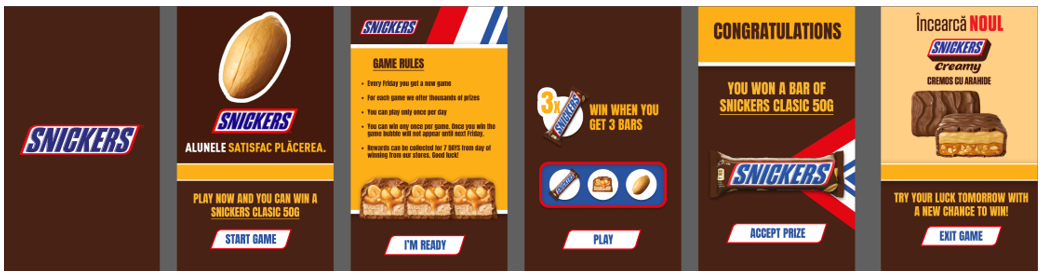
For inspiration, here’s a collection of Figma designs examples for various games types.
Below is a recommendation for design assets that you should prepare for a new game so you can easily set it up in the Gameplay Editor.
| Page | Assets |
|---|---|
| All screens |
- Background color / image / video - Header or footer for all screens (brand or product related, eventually with a motto text) - Call to actions buttons could be images with brand font and style |
| Preloader | - Logo (brand or product) |
| Intro | - Prize Product image - Video with product/campaign (not background movie, but Video Add-on) |
| Game Rules (optional) | - Logo |
| Game |
- Customize Game Element (Wheel, Scratchpad, Dices, etc.) - Prize Product Image (small) |
| Win |
- Prize Product Image (large) |
| Lose |
- Prize Product Image (medium) |