Limit
The Limit block controls how many customers may continue through a campaign flow. Place it in front of an activity and set a limit for everybody together, a limit per customer, or both. Customers who are over a limit do not move forward.
A pass is one time a customer reaches the Limit block and is allowed to continue to the next step.
Use it for rules such as: - "Only first 10,000 customers may receive this game." - "A qualifying customer may receive a push notification at most once per day." - "A customer may take part in this flow three times per week."
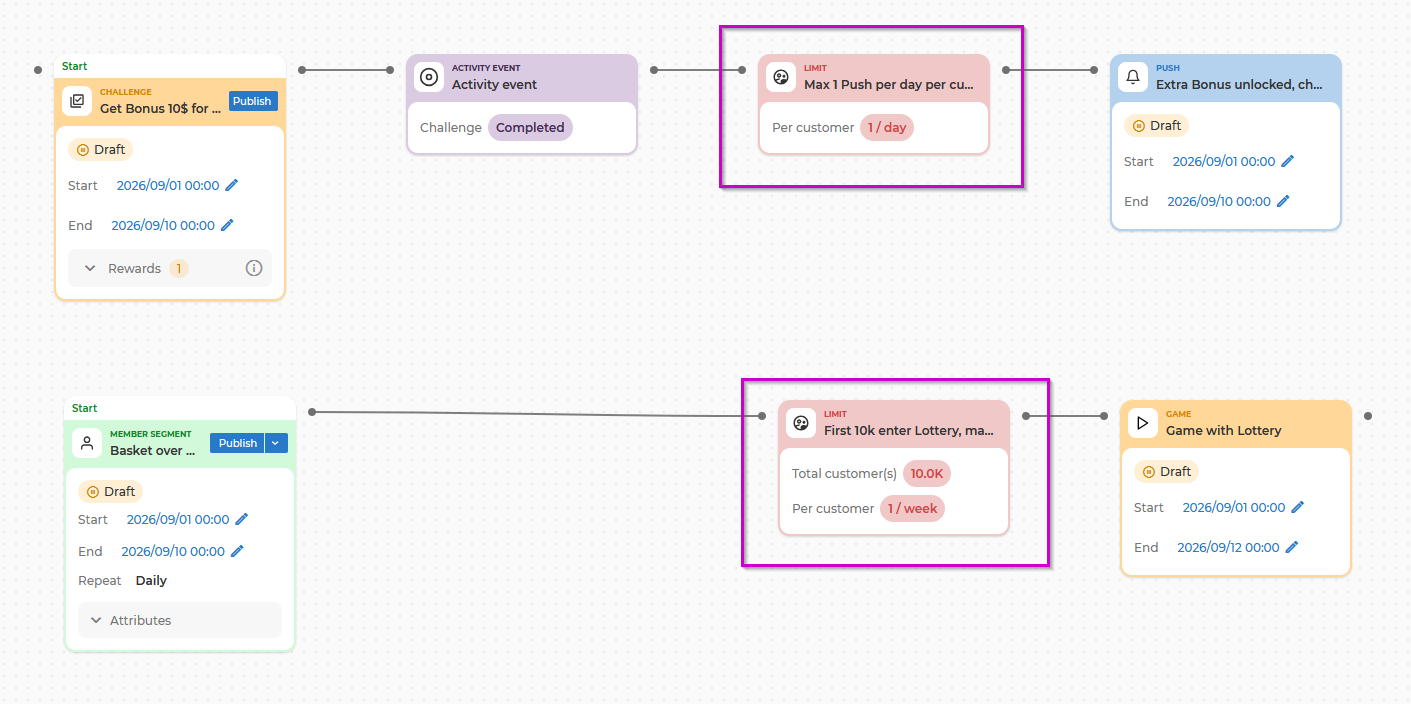
The block counts how many times customers pass through this step in this flow. A total limit counts passes, not unique people: a customer who is allowed to pass three times uses three of the total. It does not count rewards or messages given out by other flows, other activities, or direct integrations.
It works the same way with both kinds of input: a segment of customers and or one customer at a time from a real-time event.
This page covers the new Limit block (depicted as "Limit (new)" in the block library). The block will replace the older block re-named now as Limit (soon deprecated).
The limits you can set
Open the block by double-clicking it, give it a Name, and add your rules with Add limit. There are four rules to choose from, and you can add each one once:
| Rule in the menu | What it does | How it reads on the form |
|---|---|---|
| Total number of customers - one shared counter, never resets | Caps how many passes this block allows in total, across everybody | At most [N] customer(s) in total may pass this step |
| Per customer, in total - never resets | Caps how many times one customer may ever pass | Each customer may pass at most [N] times in total |
| Per customer, per week - resets each calendar week | Caps how many times one customer may pass per week | Each customer may pass at most [N] times per [V] calendar week(s) |
| Per customer, per day - resets each calendar day | Caps how many times one customer may pass per day | Each customer may pass at most [N] times per [V] calendar day(s) |
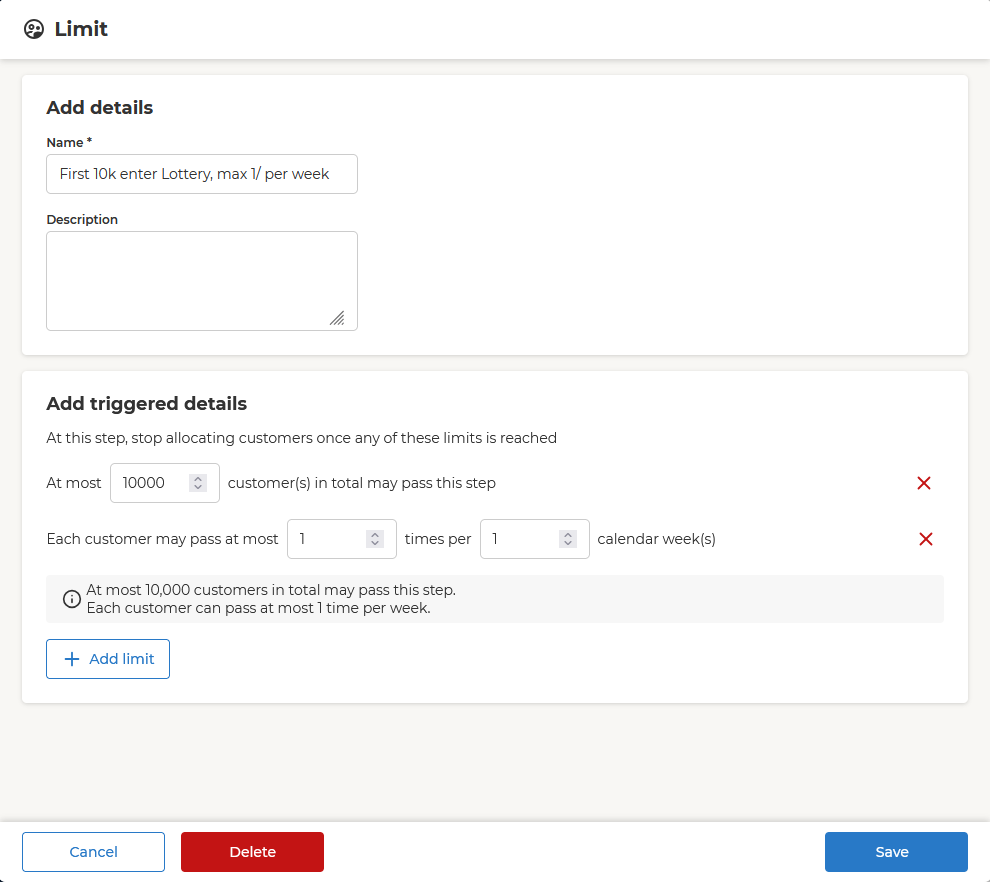
At least one rule is required - the block cannot be saved without one. Every number must be a whole number of 1 or more. A week rule may count over up to 12 weeks and a day rule over up to 90 days. Longer periods are not supported.
To remove a rule, select the x at the end of its row. Removing a rule clears its values, so you must enter them again if you add that rule back. After all four rules are added, Add limit is disabled until you remove one.
As you type, the block shows a plain-language summary of what you have configured, for example:
At most 10,000 customers in total may pass this step. Each customer can pass at most 5 times in total, 3 times per week and 1 time per day.
How the rules work together
A customer must satisfy every rule you have set in order to pass. If you set "once per day" and "3 per week", a customer who has already passed today is stopped by the day rule, and a customer who has passed three times this week is stopped by the week rule.
Think of the rules as a series of caps, from the broadest to the most specific:
Total number of customers >= Per customer, in total >= Per customer, per week >= Per customer, per day
What the total counts
Use the total rule to cap all passes through this block. For example, to hand out at most 10,000 rewards once each, set the total to 10,000 and add Per customer, in total: 1.
The total limit has no period. It counts for as long as the block exists and it never resets at the turn of a week, month or year.
How periods are counted
Daily and weekly limits use the time zone you, as retailer, are placed in. A daily limit resets at midnight in your time zone, and a weekly limit runs from Monday to Sunday. For a multi-day or multi-week limit, the window is anchored to each customer's first pass and rounded back to the start of the day or to Monday.
- A day runs from midnight to midnight. "Once per day" means once per calendar day: a customer who passes at 17:00 is eligible again at midnight, not at 17:00 the next day.
- A week runs from Monday to Sunday.
When a rule counts over more than one day or week, the window starts from that customer's own first pass in that window, rounded back to the start of the day or to the Monday:
| Rule | The customer's first pass | Their window | Eligible again |
|---|---|---|---|
| 1 time per 1 calendar day | Monday 17:00 | Monday 00:00 - Tuesday 00:00 | Tuesday 00:00 |
| 1 time per 3 calendar days | Monday 17:00 | Monday 00:00 - Thursday 00:00 | Thursday 00:00 |
| 3 times per 1 calendar week | Thursday | Monday 00:00 - Sunday 23:59 of that week | the following Monday |
For multi-day and multi-week rules, each customer has their own anchored window. When a window ends, the customer's next pass starts a fresh one.
Adding the block to a campaign
- Open your campaign in Orchestration view.
- Open the Block library, go to Controls, and drag Limit (new) onto the canvas.
- Connect it so it sits between the customers coming in and the activity you want to protect - after a supported segmentation block or an event trigger, and before the activity.
- Double-click the block to open its configuration.
- Give it a Name that says what it protects, for example "Daily push frequency limit", optionally a Description, and add the limits you need with Add limit.
- Save. The block takes effect immediately.
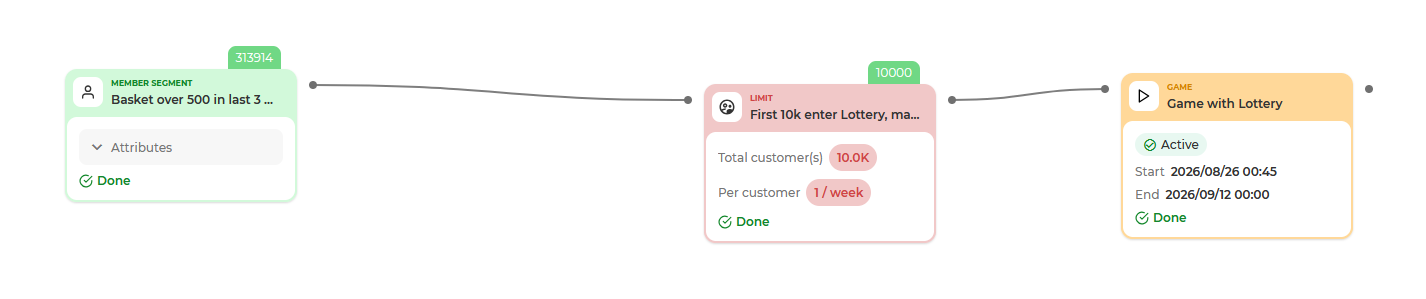
The block has no separate publish step: your limits apply as soon as you save them. The canvas label shows the configuration at a glance - Total customer(s) and one Per customer line per rule.
You can use more than one Limit block in the same flow. Each one counts on its own.
Where the block can and cannot sit
- It takes one input: an event trigger or a supported block that produces a segmentation result.
- An Enrich block cannot come directly before Limit; place Limit before Enrich instead.
What happens to customers over a limit
Customers who are over a limit are dropped out of the flow at that point. They are not held back for later and they do not continue further into the flow.
A run in which every customer is stopped is still a successful run - it simply passes nobody on. After the run, the block shows how many customers it let through. Current results do not show how many customers were stopped or which rule stopped them.
Changing, copying and deleting the block
- You can change any limit while the campaign is running, including adding and removing rules.
- Removing or lowering a limit does not take anything back: customers who have already passed forward in the flow keep what they got.
- Renaming the block does not reset its count.
- The count survives drafting the campaign. If you take the campaign to Draft for two weeks and activate it again, the Limit block continues from where it was.
- Copying the block, or deleting it and adding a new one, starts the count from zero. This is also how you reset a count on purpose: add a new Limit block with the same settings.
- Deleting the block and saving the campaign removes that block including its counters.
Limitations
- The Limit block counts passes through this specific part of the flow. It is not a cap across your campaigns. If a customer qualifies for three campaigns that each allow one pass per day, they are admitted to all three.
- The total limit does not reset by period. Once the block has passed its total, no further customer passes, even after the turn of a month. Raise the number, or add a new block to change the limit.
- If the activity behind the block fails, or is still in Draft, a customer who passes through uses one of their passes even though they receive nothing further down the flow.
- Count and Simulation runs show nothing at or beyond the block. A preview cannot tell you how many customers the Limit block would let through.
- When a total limit runs out part-way through a large segment, customers are shuffled as they are processed.
- A per-customer limit is not protection against fraud or multiple accounts. It does not stop someone deliberately using several accounts.