Redemption Bonus Activity
The Redemption Bonus Activity allows retailers to grant customers additional bonus cash based on their current bonus balance. This activity is designed to reward customers with extra bonuses, loaded directly to their accounts, according to predefined balance thresholds and within a specific time frame.
Key Features
- Balance-Based Rewards: Grant a fixed amount or a percentage of the customer’s current bonus balance as additional bonus cash.
- Scheduled Bonus Loading: Set the exact date and time when the additional bonus will be credited to customer accounts.
- Bonus Expiration: Configure an expiration date for the loaded bonus. If the bonus is not spent within this period, it will be automatically withdrawn.
- No Product Exclusions: The activity is based solely on bonus balance and does not involve product or category exclusions.
- Targeted Applicability: Activities can be universal or limited to specific member segments, stores or chains
Use Cases
-
Bonus Loading Based on Existing Balance
Objective: Encourage customers with varying bonus balances to engage and spend their bonuses.
Action: Configure 10% of the current balance as additional bonus cash on a specified date. -
Limited-Time Redemption Incentive
Objective: Motivate customers to spend their newly loaded bonus within a short period.
Action: Set an expiration date for the loaded bonus. If the bonus is not used by the expiration date, it is automatically withdrawn from the customer’s account.
Example: * On 08.03.2024 at 08:00, a customer with a bonus balance of $150 receives an additional $15 (10% of their balance). * The loaded bonus is available until 10.03.2024. * If the customer does not spend the $15 bonus by the expiration date, it is taken back at the end of 10.03.2024 or beginning of 11.03.2024, depending on the expiration job configuration
1. Bonus Details
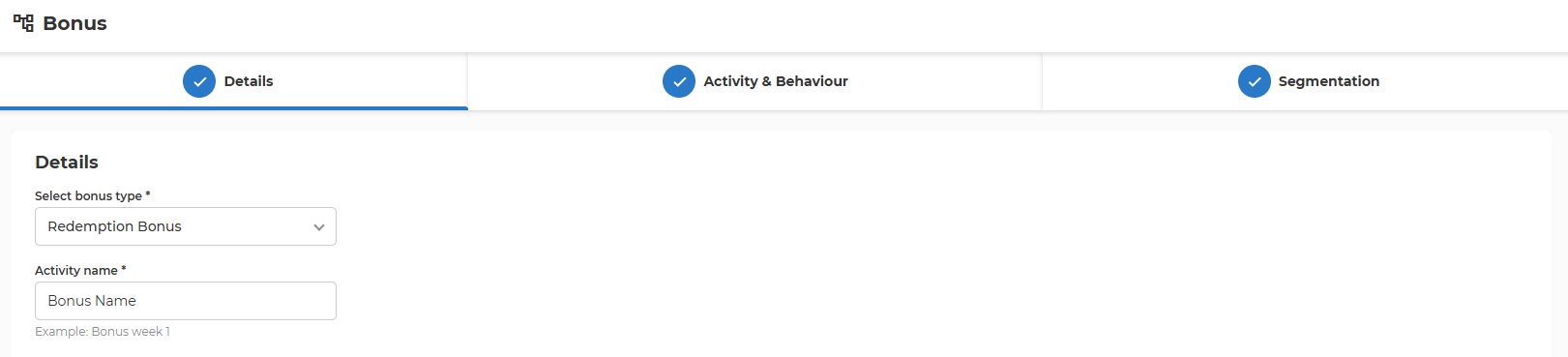
- Select bonus type
- Choose the type of bonus for the activity. In this case, select "Redemption Bonus".
- Activity name
- Enter the name of the bonus activity.
- Maximum size: 128 characters
2. Activity & Behaviour
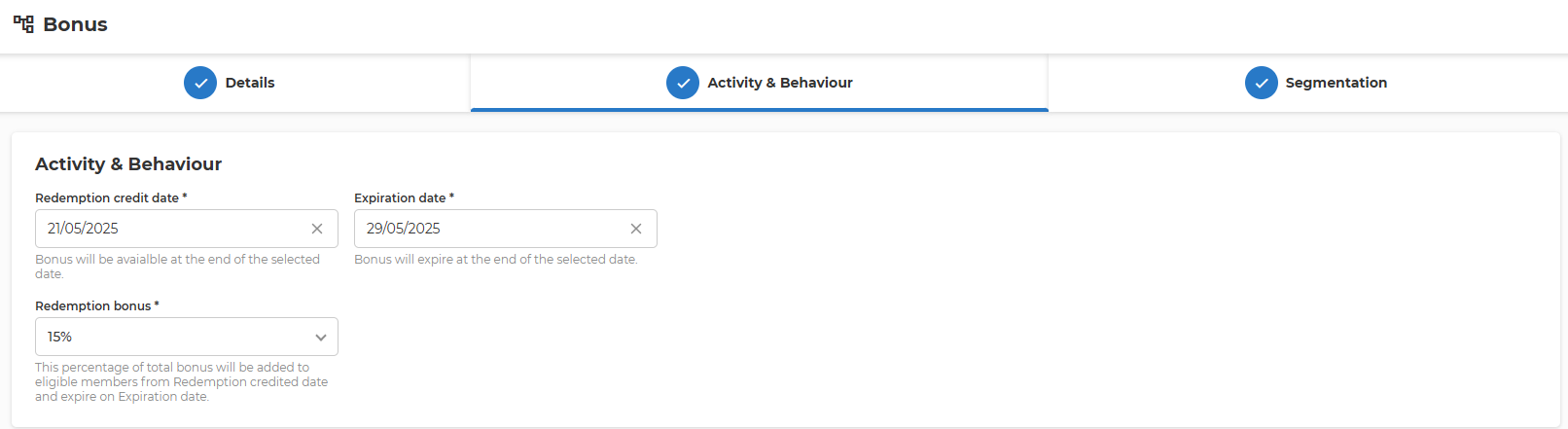 1. Redemption credit date
* Specifies the date when the additional bonus will be credited to eligible members’ accounts. The bonus becomes available at the end of this date.
* The selected date cannot be in the past
-
Expiration date
- Sets the date when the credited bonus will expire. If the bonus is not used by the end of this date, it will be automatically withdrawn from the member’s account.
- Expiration date cannot precede redemption credit date
-
Redemption bonus
- Select from a predefined list the percentage of the member’s current bonus balance that will be added as an extra bonus. This amount is credited on the Redemption credit date and remains available until the Expiration date.
3. Segmentation
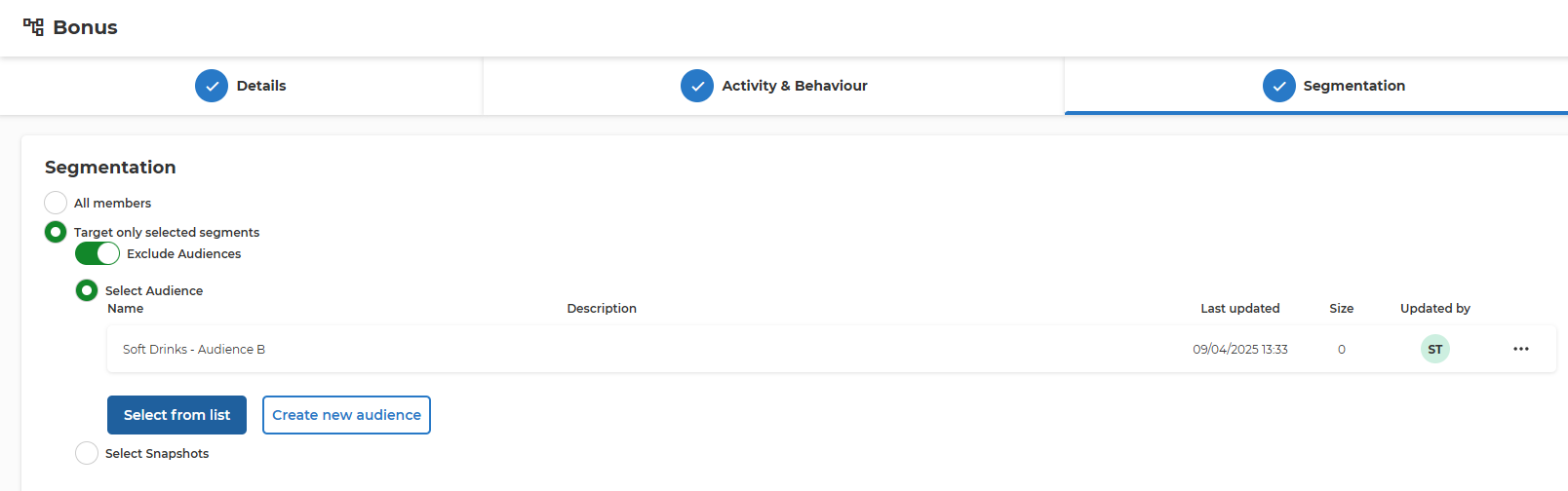
- All members
- Apply the bonus activity to all members.
- Target only selected segments
- Apply the bonus activity to specific audience segments.
- When this option is chosen, additional settings appear to define the targeted audience.
- Exclude Audiences
- Choose whether to exclude or include the selected audiences in the activity.
- If enabled, excluded audiences will not be eligible for the bonus.
- Select Audience Name
- Some customers have integration with Audience Service that allows the management of Member Segments in one centralized place and reuse throughout the other promotion and communication sections.
- Specify the audience segment to target.
- Select from list
- Select from list of predefined segments brings up a pop-up where all predefined audiences are listed. Based on the name and description the needed Audience can be selected as a target for this bonus activity.
- Create new audience
- Create a new audience segment if the desired segment does not already exist.
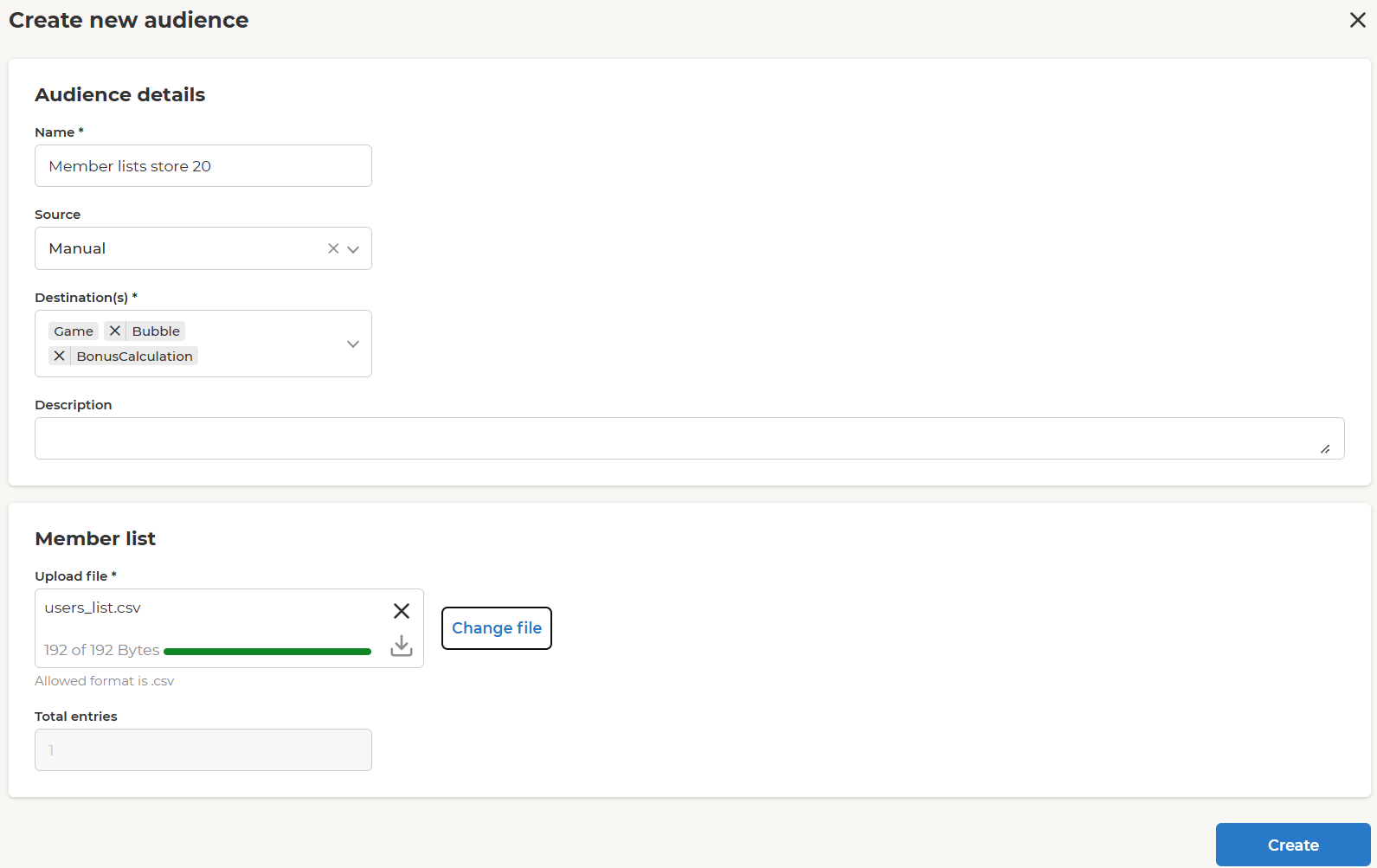
- Name – use a representative name.
- Destination(s) – select where this list of members will be available for selection. Can be only Bonus activities or throughout other activities (e.g. Challenge, Feed, Notifications, etc.).
- Description – longer text field that allows detailed description.
-
Upload file - the list of member IDs should be uploaded in a CSV with one member ID per line.
-
Select Snapshots
- Target specific snapshots of audience data.
Prioritization and Overlap Rules
- Multiple activities are applied on top of each other. No prioritization is applied