Offers Overview
An Offer is a configured promotion that defines what benefit a member gets and under what conditions. A Coupon is an instance of an offer allocated to an individual member that redeemed at checkout with rules and redemption limits. Offers and coupons are closely related because coupons are essentially a specialized, member‑bound instance of an offer, and both ultimately drive the discount applied through Lobyco’s discount calculation services.
Promotional offers can be fully managed in the Promotions Portal and used as regular loyalty offers or rewards in engagement products (Games, Challenges, Sticker Campaigns, etc.).
Lobyco services can manage the end-to-end flow of offers, from the creation to the allocation and redemption of coupons at the member level, and discount calculation when integrated with the checkout system (POS or E-commerce).
Depending on your promotion services capabilities, the Lobyco Promotions Portal could also act just as a place to import the offers from your promotions system and enhance them with customer-facing information, like images, terms and conditions, etc.
Discounts settling
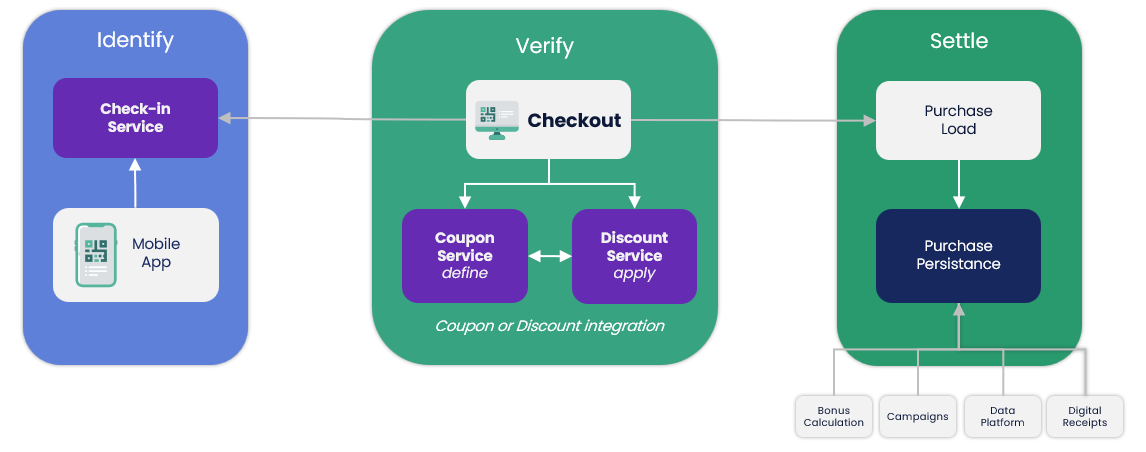
Your checkout (POS and/or e-commerce) will interact with Lobyco in one of two ways; a simple Coupon Service integration or a full integration to the Discount Engine.
- Using the Coupon Service, the POS will receive applicable loyalty coupons and offer details at member level
- Alternatively, a full integration to the Discount Engine will also allow you to run all loyalty promotion calculations through Lobyco and feed the new price and discount information directly to the checkout, ensuring a uniform application of discounts across all locations and channels
Post-purchase, all member benefits are processed, for example, application of earned bonus, progress on continuity campaigns, and displaying of digital receipt
The platform includes reporting that may be used for financial settlement and import to other systems
Coupon redemption
The coupon redemption method will also be settled during the integration with your checkout system. We have a recommended way to apply and redeem coupons, while we allow for some flexibility to help you build a user journey that fits your needs.
The coupon redemption flow might be different depending on the checkout channel, POS or E-commerce.
Coupon redemption at POS
During the checkout flow, all active member coupons are retrieved, either at customer check-in and/or subtotal/total. Active means coupons that are within the validity period and have been activated or are already pre-activated.
We do not recommend giving the user the option to choose which coupons should be used for this transaction at the POS. This prolongs the checkout total time and creates extra complexity for the POS integration.
Optionally, the coupons could be reserved for some time (e.g. 1-5 minutes) to better handle fraud attempts of using the same coupon in parallel at different POSes.
At total the Lobyco coupons are stacked with the preexisting coupons as aligned during implementation.
Lobyco coupons are applied in the order of their stacking priority and usage settings. The applied coupons are redeemed and the unused coupons have their reservation canceled if it was done in the first place.
In case of returns, Lobyco supports refunding used coupons and making them available if they are still within the main campaign validity period. This needs to be done specifically to return the coupons, Lobyco doesn't automatically calculate which coupon should be returned.
Coupon redemption online (e-commerce)
During the checkout flow, all active or available member coupons are retrieved, either at customer check-in and/or subtotal/total. Active means coupons that are within the validity period and have been activated or are already pre-activated. Available means that are within the validity period but have not been activated.
The user could be given the option to activate any available coupons and decide which should be applied.
Additionally, depending on the selected delivery date, the user could get a hint that some coupons will not be available until the delivery date. For example, the selected delivery date is in 3 days and the coupon expires in one day. The user could choose to remove those coupons or to change the delivery date to accommodate the expiring coupons.
Optionally, the coupons could be reserved for some time (e.g. 1-5 minutes) to better handle fraud attempts of using the same coupon in parallel at different POSes.
At order placement the Lobyco coupons are stacked with the preexisting coupons as aligned during implementation.
Lobyco coupons are applied in the order of their stacking priority and usage limits. The applied coupons are redeemed and the unused coupons have their reservation canceled if it was done in the first place.
Based on the desired flow, the coupons could be reserved or not at order placement.
If coupons are reserved, then they will be redeemed or the reservation canceled when the order is fulfilled.
Otherwise, the coupons could be used in the meantime the the user but the e-commerce order might have a higher price at delivery time than at the checkout.
Offer statistics
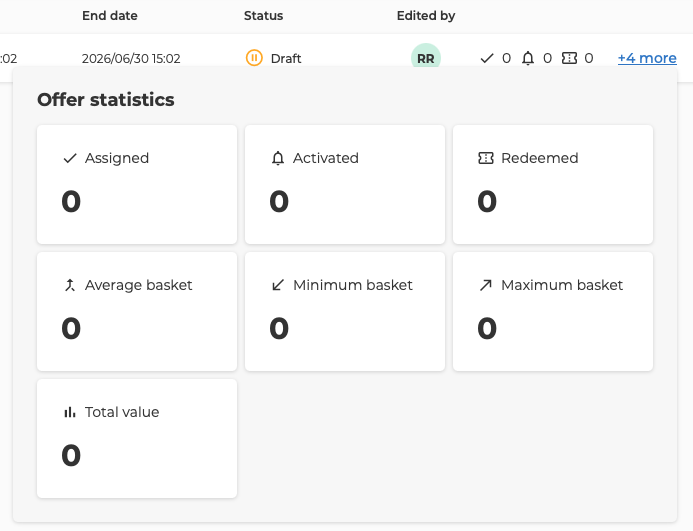
Offer statistics are available directly in the Campaign view, showing key performance indicators at a glance. Users can see core metrics (Assigned, Activated, Redeemed) in the list and click “+ more” to open a popup with extended statistics.
Statistics Definitions
- Assigned – Total number of coupons assigned to members.
- Activated – Total number of coupons activated by members.
- Redeemed – Total number of coupons redeemed at checkout.
- Average basket – Average basket value for transactions where the Offer was redeemed.
- Minimum basket – Lowest basket value recorded for Offer redemption.
- Maximum basket – Highest basket value recorded for Offer redemption.
- Total value – Total basket value generated from Offer redemptions.