How to work with segmentation attributes
Overview
Segmentation attributes are the building blocks of your segments. Each attribute represents information about a member, such as age, purchase history, or app activity. You combine these attributes in Segment Builder to define your target audience.
Note that some attributes may not be available in your system, depending on data availability and agreements with Lobyco.
Attribute categories
Attributes are grouped into categories based on the type of information they describe:
- Membership – member profile data such as age, gender, region, or signup date.
- Membership – Custom – retailer-defined member attributes specific to the retailer's business.
- Loyalty Card – details of member loyalty cards.
- Purchase – purchase history and transaction data.
- Bonus – bonus balance information.
- Consent – communication and marketing consents.
- Data Science – machine-learned or computed attributes.
- App Data – member activity in the mobile app.
- Abandoned Transactions – details of incomplete Scan & Pay or self-checkout purchases.
Quick navigation
Use the Search field to find attributes. Results update as you type.
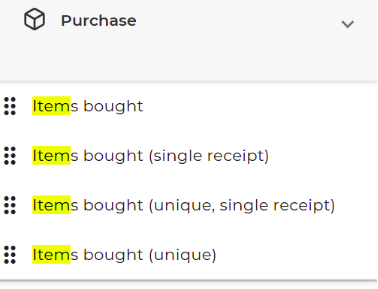
Attributes list
Membership
| Name | Description | Source of data |
|---|---|---|
| AddressLine1 | First line of the member’s street address | Lobyco Member service |
| AddressLine2 | Second line of the member’s street address (e.g., apartment or suite) | Lobyco Member service |
| Age | Age of member | Lobyco Member service |
| City | City where member lives | Lobyco Member service |
| CountryCode | Country code associated with the member’s registered address | Lobyco Member service |
| Date of birth | Birthday of member | Lobyco Member service |
| Days since signup | Number of days since the member signed up | Lobyco Member service |
| Days to birthday | Number of days until member’s next birthday | Lobyco Member service |
| The email address associated with the member's account | Lobyco Member service | |
| First name | First name of the member | Lobyco Member service |
| Gender | Gender of the member | Lobyco Member service |
| Is Employee | Indicates whether the member is an employee (true/false) | Lobyco Member service |
| Last name | Last name of the member | Lobyco Member service |
| LoyaltyProgram | The loyalty program the member is enrolled in | Lobyco Member service |
| Membership number | Unique membership number | Lobyco Member service |
| Nationality | Nationality as declared or registered by the member | Lobyco Member service |
| Phone | The phone number linked to the member's account | Lobyco Member service |
| Preferred comm channel | Preferred method of communication (e.g., email, SMS, push notification) | Lobyco Member service |
| PreferredLanguage | Preferred language for communication | Lobyco Member service |
| Region | Region where member lives | Lobyco Member service |
| Self picked store | Store chosen at signup or updated later | Lobyco Member service |
| Sign up date | The date the member registered | Lobyco Member service |
| Zip code | Zip code where member lives | Lobyco Member service |
Loyalty Card
| Name | Description | Source of data |
|---|---|---|
| Loyalty Card Created date | The date the member’s loyalty card was created | Lobyco Member service |
| Loyalty Card ID | Unique identifier for the loyalty card | Lobyco Member service |
| Loyalty Card state | Current status of the loyalty card (active, inactive) | Lobyco Member service |
| Loyalty Card type | Type of loyalty card (virtual, physical) | Lobyco Member service |
Purchase
Note: Some attributes require combination with purchase date to work.
If no purchase date is applied, the default range is the past 90 days.
| Name | Description | Requires purchase date | Source of data |
|---|---|---|---|
| Amount spent | Total money spent within specified period | Yes (default 90 days) | Lobyco Purchase load service |
| Amount spent single receipt | Total money spent on a single receipt | Yes (default 90 days) | Lobyco Purchase load service |
| Items bought | Total number of items bought | Yes (default 90 days) | Lobyco Purchase load service |
| Items bought single receipt | Total items bought in one purchase | Yes (default 90 days) | Lobyco Purchase load service |
| Items bought unique | Number of unique items bought | Yes (default 90 days) | Lobyco Purchase load service |
| Items bought unique single receipt | Number of unique items bought in one purchase | Yes (default 90 days) | Lobyco Purchase load service |
| Product | Opens a wizard to select products or hierarchies | Yes (default 90 days) | Lobyco Product catalog service |
| Purchase completion method | Method used (in-store, online, self-checkout) | Yes (default 90 days) | Lobyco Purchase load service |
| Purchase date | Date of purchase | No | Lobyco Purchase load service |
| Receipt count | Number of receipts | Yes (default 90 days) | Lobyco Purchase load service |
| Store | Store of purchases | No | Lobyco Store service |
| Store chain id | Store chain identifier | No | Lobyco Store service |
| Store chain name | Name of the store chain | No | Lobyco Store service |
Bonus
| Name | Description | Source of data |
|---|---|---|
| Bonus Amount to Expire | Amount of bonus scheduled to expire from member’s account | Lobyco Bonus service |
App Data
| Name | Description | Source of data |
|---|---|---|
| Average time per app visit (minutes) | Average duration per app visit | Lobyco App |
| Count of app visits | Number of times the member opened the app | Lobyco App |
| Days since last app visit | Number of days since member last used the app | Lobyco App |
| Total time on app visits (minutes) | Total time spent in the app | Lobyco App |
| Visits Date | The dates when the member accessed the app | Lobyco App |
Consent
| Name | Description | Source of data |
|---|---|---|
| Whether the member consented to receive emails | Lobyco Consent service | |
| E-mail (date) | Date of consent for emails | Lobyco Consent service |
| Personal Offers | Whether member consented to personalized offers | Lobyco Consent service |
| Personal Offers (date) | Date of consent for personalized offers | Lobyco Consent service |
| SMS | Whether member consented to SMS messages | Lobyco Consent service |
| SMS (date) | Date of consent for SMS | Lobyco Consent service |
| Terms and conditions | Whether member accepted terms and conditions | Lobyco Consent service |
| Terms and conditions (date) | Date member accepted terms | Lobyco Consent service |
| Consent | Generic consent attribute that is represented by a set of 2 drop down lists. Using first drop down you select the type of consent (like 'E-mail', 'SMS', etc.). Using the second drop down you select the version and revision for the selected consent type. This attribute is designed to replace all the specific consent type attributes mentioned above. | Lobyco Consent service |
Data Science
| Name | Description | Source of data |
|---|---|---|
| Recency Frequency M. Value | Machine-learned score classifying members by recency, frequency, and spend | Lobyco Data Science |
Abandoned Transactions
| Name | Description | Source of data |
|---|---|---|
| Abandoned transaction count | Number of unfinished Scan & Pay/self-checkout transactions | Lobyco Basket service |
| Abandoned transaction date | Date a transaction was abandoned | Lobyco Basket service |
| Abandoned transaction reason | Recorded reason (if any) the transaction was not completed | Lobyco Basket service |
Membership – Custom
The Membership – Custom category contains retailer-specific member attributes that are unique to retailer's business. These are custom metadata parameters imported by the retailer into Lobyco system, which validates, stores, and exposes them for use in Segment Builder.
Custom attributes work exactly like standard attributes: the marketeer will find them by expanding the Membership – Custom category in the attributes panel, or by searching in the search field. Custom attributes support String, Number, Date, Boolean(true/false values) data types.
Note: The attributes available under this category depend on what attributes are defined and imported trough the integration endpoints . Not all retailers will have the same custom attributes, and some retailers may have none. Contact your Lobyco integration team for more details on how to define custom attributes and how to import data.
Example attributes
The following table shows an example set of custom attributes
| Name | Description | Source of data |
|---|---|---|
| Loyalty Points | Current loyalty points balance in the retailer's loyalty program | Retailer member data |
| Loyalty Tier | The tier level the member has reached (e.g. Silver, Gold, Platinum) | Retailer member data |
| Member Score | A retailer-defined score used for internal member classification | Retailer member data |
| Member Since | The date the member first joined the retailer's loyalty program | Retailer member data |
| Nickname | Display name or preferred name used by the member | Retailer member data |
| Premium Member | Indicates whether the member holds a premium membership status (true/false) | Retailer member data |