Voucher statistics and report
Voucher statistics
Click on the arrow of a campaign to get a quick overview of the voucher campaign. You can see in real-time the different statistics of vouchers (assigned, activated, spent) and different purchase data (basket sizes, total allocated bonus, etc.).
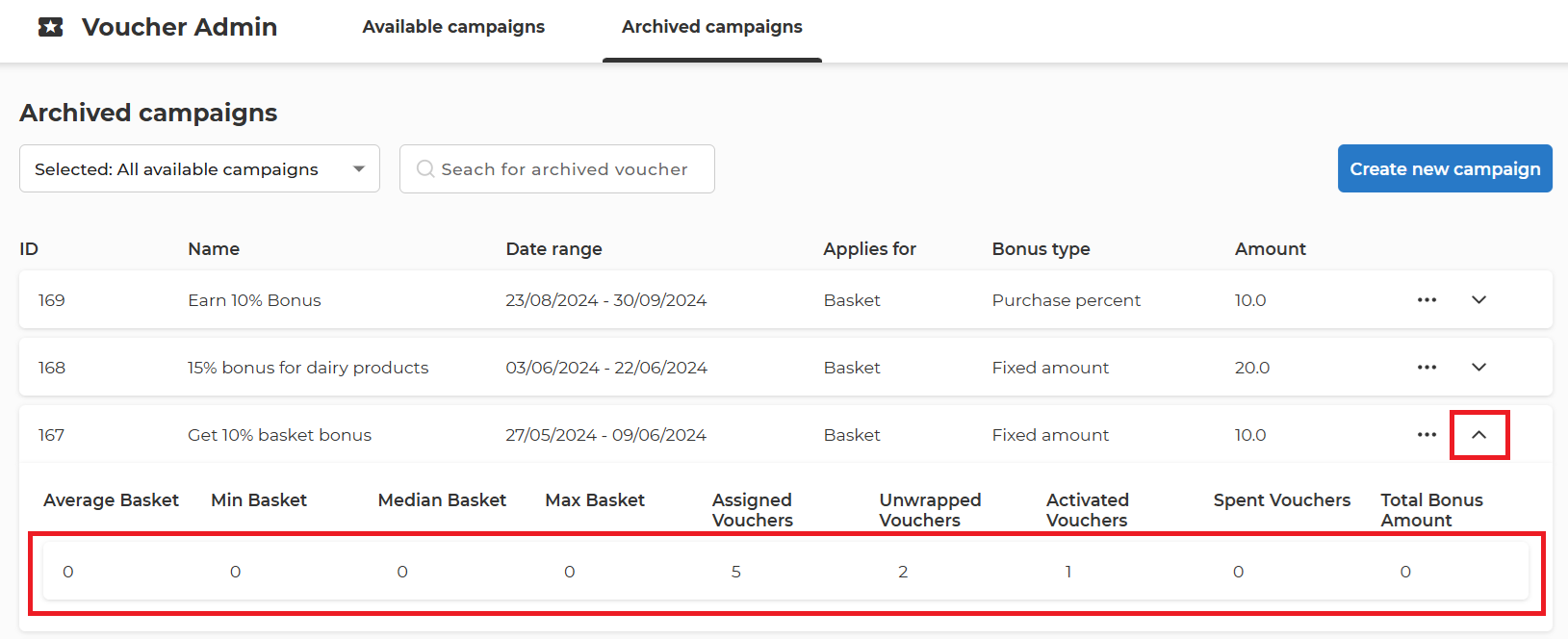
- Average Basket – the average purchase amounts for the baskets that used vouchers.
- Min Basket – minimum value of the basket where a voucher was used.
- Median Basket – medium range value (between min and max) of baskets where a voucher was used.
- Max Basket - maximum value of the basket where a voucher was used.
- Assigned Vouchers – number of assigned vouchers in this campaign.
- *Assigned voucher for campaigns created for all users shows the number of users that visited the Home Screen of the App and the Voucher Bubble was shown to them. This is to prevent the allocation of a potentially high number of vouchers at one time when actually only a limited percent of users are active and will interact with the voucher.
- Unwrapped Vouchers – number of users that clicked on the voucher bubble.
- Activated Vouchers – number of users that activated the vouchers.
- Spent vouchers – number of spent vouchers. Could be higher than the number of assigned vouchers if the campaign allows multiple voucher uses.
- Total Bonus Amount – total bonus amount allocated by this campaign.
Voucher report
Click on "..." to download an XLS report detailing how the voucher has been used and for which amounts. This contains real-time data about activations and usage.


The voucher usage report is used to charge the right entity (sponsor) of the campaign with the actual cost of the bonus paid to the member. The report also reveals the stores where the vouchers have been spent.