Deeplinks to specific activities
Deep links to activities are configured by selecting a Deep Link Type and providing the corresponding Activity ID.
| Activity | Deep Link Type | Description | Parameter |
|---|---|---|---|
| Game | GAME_BY_ID |
Opens a specific game | gameId - activity id of the game |
| Challenge | CHALLENGE_DETAILS |
Opens a specific challenge | stampCardId - activity id of the challenge |
| Offer | COUPON_DETAILS_BY_COUPON_ID |
Opens a specific offer | campaignId- activity id of the offer couponId - the Id of the coupon to open. |
| Feed | INSPIRATION_FEED_BY_ID |
Opens a specific feed | feed_id - activity if of the feed |
Configuration
To configure a deep link to a specific activity:
-
Select the appropriate Deep Link Type (e.g.
GAME_BY_ID,CHALLENGE_DETAILS) -
Enter the Activity ID in the parameter field (e.g.
gameId,stampCardId)
🔄 Change in Activity ID Retrieval
Previous Behavior
-
The Activity ID was extracted from the URL of the activity configuration page
-
This required manual parsing and could lead to errors
Current Behavior
-
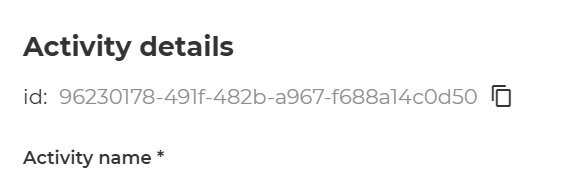
The activity configuration page URL does not contain anymore the activity id.
-
The Activity ID is displayed explicitly in a read-only field within the configuration page
What This Means
- You should no longer copy IDs from the URL
- Always use the Activity ID shown in the dedicated field
- This reduces errors and ensures the correct activity is targeted
Best Practices
- Ensure the activity is published and accessible before using the deep link
- Double-check that the correct Activity ID is used
- Align the deep link with the message content for a consistent user experience