Bounce Battle
Players control a paddle to keep the ball in play for as long as possible.
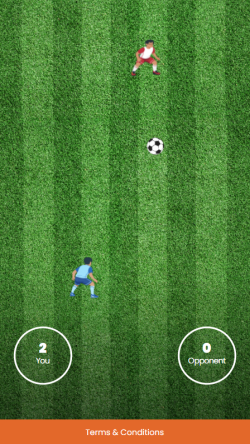
The graphical recommendations included in this guide are game-specific.
All graphics in this game are optional.
In the Bounce Battle game, the 'Visuals' tab includes styling options for:
- Game orientation
- Divider
- Paddles
- The ball
Game orientation
In the Bounce Battle game, you can choose between a horizontal or vertical game orientation. You should use vertical game orientation for Mobile App.
If you are using icons, these will automatically adjust to the game orientation.
Paddle visuals
You can either use icons for the paddles or upload your own graphics. The recommendations for the paddle visuals are based on traditional paddle visuals - a rectangular, narrow-shaped graphic. But you can upload any graphic that matches your game concept.
Paddles: Mobile Recommendations
- Number of paddle images: Maximum two images (1 for each player)
- Recommended minimum size: 5 x 50px*
- Recommended maximum size: 10 x 100 px*
- Recommended as .png with a transparent background.
Paddles: Desktop recommendations
- Number of paddle images: Maximum two images (1 for each player)
- Maximum size: 100 x 300px
- Recommended size: 10 x 100 px
- Recommended as .png with a transparent background.
*Please be aware that recommendations may vary depending on the size of the ball. The recommendations are based on a ball visual with a size of 20 x 20px.
Ball visual
Ball: Desktop recommendations
-
Number: 1
-
Maximum size: 100 x 100px
-
Recommended aspect ratio: 1:1
-
Recommended size: 40 x 40 px
-
Recommended as .png with a transparent background
Ball: Mobile Recommendations
-
Recommended size: 20 x 20 px
-
Recommended as .png with a transparent background
Minimize spacing around graphic
If you are uploading graphics to use for your paddles or ball, we recommend that you minimize the spacing around the actual graphic for the best visual results. You should consider avoiding using objects with a shadow or glow-effect since this can impact the game experience.
You can use the built-in crop effect to limit any spacing in your graphic.